PROMASTERTOOL™ Corner Radius Router Template Set
PROMASTERTOOL™ Corner Radius Router Template Set
 Woodworking E-Book as a Gift!
Couldn't load pickup availability

Make the same rounded corner, project after project
Shape consistent corners on shelves, desktops, panels, and other woodworking projects with the PROMASTERTOOL™ Corner Radius Router Template Set. Two aluminum templates give you eight marked corner radii, so you can choose a compact curve or a broader rounded profile and repeat it on the next workpiece.
- Eight corner radii. Choose R10, R15, R20, R25, R30, R35, R40, or R50 to suit your project.
- Reusable aluminum guides. The rigid plates provide a defined outline for a compatible bearing-guided router bit.
- Removable positioning clips. Align the template to adjacent board edges and adjust the clips with the thumb screws.

Two templates, eight clearly marked radii
The smaller template includes R10, R15, R20, and R25. The larger template includes R30, R35, R40, and R50. Each marking identifies the corner radius in millimeters.
| Marking | Corner radius |
|---|---|
| R10 | 10 mm (approximately 0.394″) |
| R15 | 15 mm (approximately 0.591″) |
| R20 | 20 mm (approximately 0.787″) |
| R25 | 25 mm (approximately 0.984″) |
| R30 | 30 mm (approximately 1.181″) |
| R35 | 35 mm (approximately 1.378″) |
| R40 | 40 mm (approximately 1.575″) |
| R50 | 50 mm (approximately 1.969″) |
Inch equivalents are approximate conversions of the metric radii.

Line up with the board edges
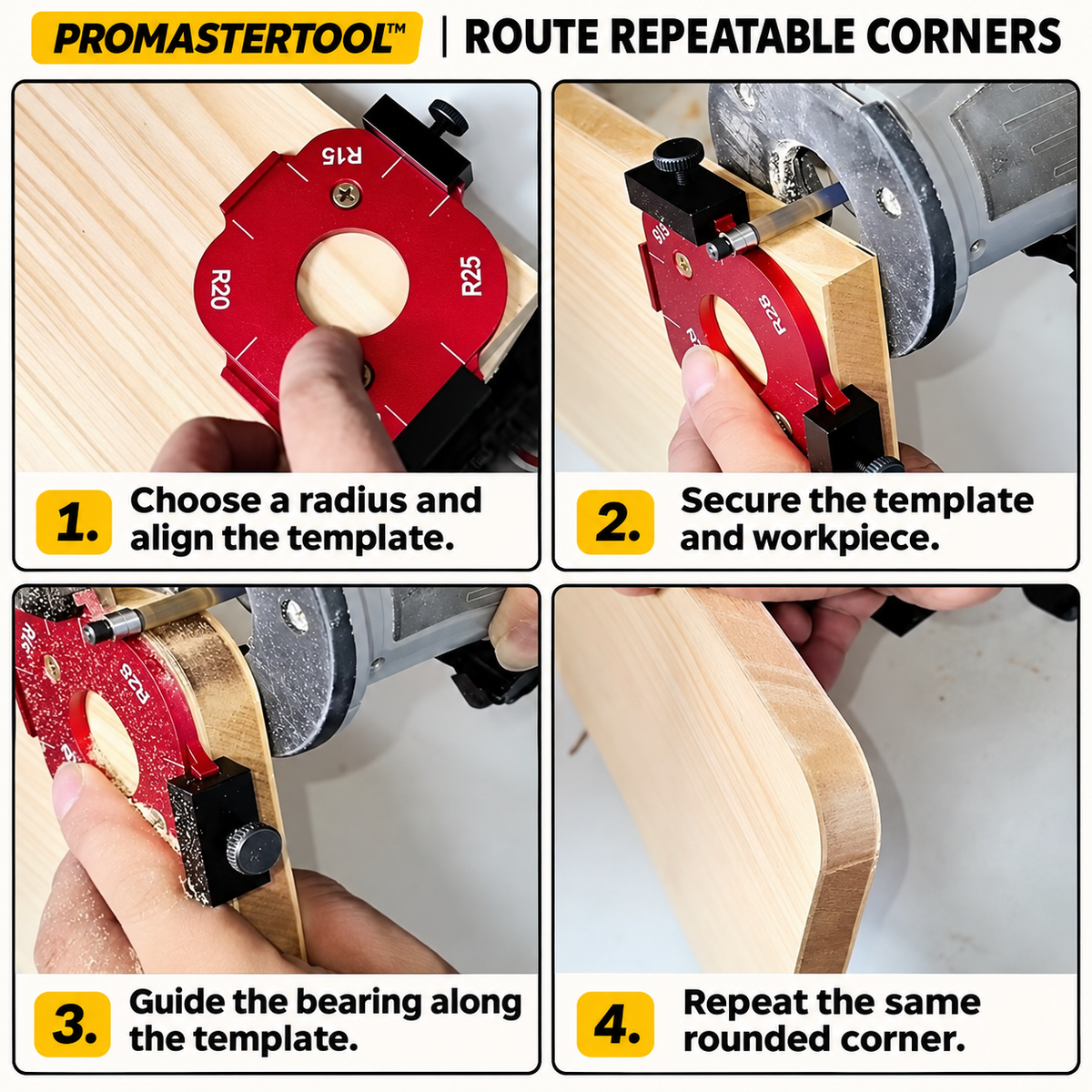
Rotate the template to bring the selected radius to the corner. The removable clips sit against the board's adjacent edges to help position the guide. Tighten the thumb screws, secure the template and workpiece, and check the setup before routing.

Choose, align, secure, and route
- Choose the radius. Select the marked corner that matches the curve you want.
- Align and secure. Seat the positioning clips against the edges and secure the template and workpiece so they cannot shift.
- Set the router bit. Use a compatible bearing-guided flush-trim or pattern bit. Position the bearing to follow the template while the cutting edges contact only the wood.
- Follow the profile. Make a test cut on scrap first, follow the router manufacturer's feed and cutting guidance, then repeat the same setup on the remaining corners.

Ready for the next project
The red aluminum alloy templates have contrasting radius markings for quick selection. Move between the small and large templates as your projects change, and remove or reposition the clips to suit the setup.
| Specification | Details |
|---|---|
| Set contents | 2 aluminum corner radius templates and 4 removable positioning clips with thumb screws |
| Template material | Aluminum alloy |
| Template finish | Red with contrasting radius markings |
| Application | Shaping rounded exterior corners on wooden boards and panels |
| Router bit | A compatible bearing-guided bit is required and is not included |
Routers, router bits, wood, and other workshop equipment shown in the photos are for illustration and are not included.

PROMASTERTOOL™ Corner Radius Router Template Set